
Last Updated on 28/08/2026 by KLB Editorial Team

A CV tells an employer what you have done. An online portfolio gives them the opportunity to see what you can do.
For professionals in design, writing, marketing, technology, photography, development and other project-based careers, an online portfolio can be a powerful addition to a CV. It gives you somewhere to showcase your best work, demonstrate your skills and provide evidence of the results you have achieved.
And you don’t need to be a web developer to create one.
In this guide, we’ll show you how to build a professional online portfolio, what to include, how to structure your website and how to create a portfolio that helps support your job applications.
- What Is an Online Portfolio?
- Who Needs an Online Portfolio?
- CV vs Online Portfolio: What's the Difference?
- What Should You Include in an Online Portfolio?
- What If You Don't Have Much Work Experience?
- How to Build an Online Portfolio Website
- How to Make Your Online Portfolio Look Professional
- How to Use Your Portfolio When Applying for Jobs
- Online Portfolio Examples
- Your Online Portfolio Is an Extension of Your CV
- FAQs about How to Build a Professional Online Portfolio
- Key Takeaway
What Is an Online Portfolio?
An online portfolio is a website where you showcase your professional work, skills, experience and achievements.
Unlike a traditional CV, which is usually limited to a few pages, a portfolio gives you more space to demonstrate your abilities through actual examples of your work.
Depending on your profession, this could include:
- Design projects and illustrations
- Writing and published articles
- Photography and video
- Websites and applications
- Marketing campaigns
- Social media projects
- Presentations and reports
- Research projects
- Case studies
- Personal or freelance projects
- Testimonials and recommendations
Your portfolio doesn’t have to contain everything you’ve ever worked on. The goal is to present your strongest and most relevant work in a clear, professional way.
Who Needs an Online Portfolio?
An online portfolio isn’t essential for every profession, but it can give job seekers a significant advantage in roles where employers need to see evidence of your skills.
It can be particularly useful for:
- Graphic and web designers
- UX/UI designers
- Developers
- Writers and copywriters
- Photographers
- Videographers
- Marketing professionals
- Social media specialists
- Illustrators and artists
- Architects
- Freelancers and consultants
However, you don’t need to work in a traditionally creative career to benefit from one.
A project manager could showcase successful projects. A marketer could demonstrate campaign results. A data analyst could present dashboards and reports. A recent graduate could showcase university projects or personal work.
The important question is:
What can you show an employer that demonstrates what you can do?
CV vs Online Portfolio: What’s the Difference?
Think of your CV as the summary and your portfolio as the evidence.
Your CV provides information about your employment history, education, qualifications and skills. Your portfolio gives employers more context and allows them to see examples of your work.
For example, your CV might say:
“Managed social media campaigns for multiple clients.”
Your portfolio could show the campaign, explain the strategy you used, provide examples of the content you created and demonstrate the results.
This gives an employer something concrete to evaluate.
A portfolio also gives you more control over your professional presentation. Instead of relying entirely on a CV template or a social media profile, you can create a dedicated space that reflects your skills, experience and professional goals.
What Should You Include in an Online Portfolio?
You don’t need dozens of pages to create an effective portfolio. A simple, well-organised website can work extremely well.
Here are the key sections to consider.
1. A Professional Homepage
Your homepage should immediately tell visitors:
- Who you are
- What you do
- What you specialise in
- What type of work you want to be considered for
Don’t make recruiters hunt for this information.
A clear headline such as:
“Graphic Designer specialising in Brand Identity and Digital Design”
is much more useful than a vague statement such as:
“Welcome to my creative space.”
Your homepage should also provide an obvious way to view your work and contact you.
2. An About Me Page
Your About page gives you an opportunity to provide context that doesn’t fit neatly into a CV.
Include relevant information about:
- Your professional background
- Your main skills
- Your areas of expertise
- What you enjoy working on
- Your career goals
Keep the focus professional. You don’t need to write your entire life story.
Think about what you would want a recruiter or potential employer to know after meeting you for the first time.
3. Your Best Work
This is the heart of your portfolio.
Choose projects that demonstrate the skills you want to be hired for. Quality is more important than quantity.
If you’re applying for a particular type of role, prioritise work that is relevant to that position.
For example, if you’re applying for a UX design position, your UX projects should be much more prominent than unrelated artwork.
4. Case Studies
Whenever possible, don’t simply display the finished project. Explain how you got there.
A good case study can include:
The Situation: What was the project or problem?
The Task: What needed to be achieved?
The Action: What did you personally do?
The Result: What happened as a result?
Where possible, include measurable results.
Instead of:
“Improved the company’s social media presence.”
you could explain:
“Created and managed a new content strategy that increased Instagram engagement by 42% over six months.”
Specific evidence makes your contribution much easier to understand.
5. Testimonials
If you have received positive feedback from clients, managers or colleagues, consider including a few testimonials.
A short, specific testimonial can provide valuable social proof.
Choose testimonials that say something meaningful about your skills, reliability, communication or results rather than simply saying that you’re “great to work with.”
6. A Contact Page
Make it easy for someone to contact you.
Include a professional email address and, where appropriate, links to relevant professional profiles such as LinkedIn or GitHub.
You can also include a simple contact form.
Don’t make a recruiter search through your website to figure out how to reach you.
What If You Don’t Have Much Work Experience?
You don’t need years of professional experience to build an online portfolio.
If you’re a student, recent graduate, career changer or just starting out, you can include:
- University or college projects
- Personal projects
- Volunteer work
- Freelance projects
- Practice projects
- Mock campaigns
- Design challenges
- Open-source contributions
- Relevant coursework
- Before-and-after examples
The key is to be honest about the work.
A personal project can still demonstrate initiative, creativity and technical ability. You simply need to explain what the project was, what you did and what skills it demonstrates.
How to Build an Online Portfolio Website
Once you’ve decided what you want to showcase, you need somewhere to put it.
There are several ways to create an online portfolio website. You can use a portfolio platform, build a website yourself or use an all-in-one website builder like Hostinger.
For job seekers who want their own professional website without learning to code, an all-in-one website builder can be one of the simplest options.
Build Your Portfolio Website with Hostinger
Hostinger offers a wide range of tools for creating and managing a professional website in one place at affordable rates. Depending on the plan you choose, this can include web hosting, a custom domain, professional email, SSL, website-building tools, AI tools, backups and customer support.
For someone building an online portfolio, this means you don’t have to piece together a hosting provider, website builder, email service and other tools yourself.
Hostinger’s portfolio website builder can also create an initial website using AI or a professionally designed template. You can then customise the layout, colours and fonts, add your projects and case studies, create your About and Contact pages, and publish your portfolio without needing web development skills.
One of the biggest advantages is the amount of functionality you get for the price. Rather than paying for several separate services, Hostinger packages many of the tools needed to build, launch and manage a website into its hosting plans. Eligible plans currently include a custom domain for the first year, along with email and other website features, although domain and email terms vary by plan and renewal charges can apply.
For a job seeker who simply wants a professional online presence, that combination can make Hostinger a practical and relatively affordable way to get a portfolio website online without taking on the technical work of building everything from scratch.
Create your online portfolio with Hostinger
How to Make Your Online Portfolio Look Professional
Your portfolio doesn’t need complicated animations or an elaborate design.
In fact, simplicity is often better.
Keep these principles in mind:
Keep Navigation Simple
Visitors should be able to find your work, About page and contact information quickly.
Use High-Quality Images
If your portfolio includes visual work, use clear, high-resolution images and make sure they display correctly on both desktop and mobile devices.
Keep Your Design Consistent
Use consistent fonts, spacing, headings and visual elements throughout the website.
Make It Mobile-Friendly
Recruiters and employers may view your portfolio on a phone or tablet. Check that your pages, images, menus and contact forms work properly on smaller screens.
Check Every Link
Before sharing your portfolio, click every link and test every form.
A broken portfolio link doesn’t make the strongest first impression.
How to Use Your Portfolio When Applying for Jobs
Once your website is ready, don’t simply build it and forget about it.
Add your portfolio URL to your:
- CV
- LinkedIn profile
- Email signature
- Professional social media profiles
- Freelance profiles
You can also include a link directly in job applications when the application allows it.
When applying for a specific role, consider whether your portfolio highlights the experience and projects most relevant to that position.
You don’t necessarily need to redesign your entire website for every application. However, making sure your strongest relevant work is easy to find can make a big difference.
Online Portfolio Examples
Tamara Sredojevic
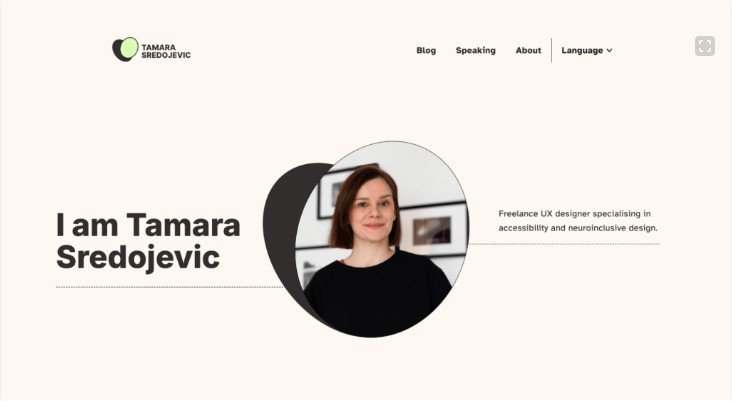
Tamara Sredojevic’s portfolio demonstrates how a professional website can communicate both expertise and personal values.
Her portfolio focuses on accessible and sustainable UX design, with clear information about the types of organisations and clients she works with.
The website demonstrates an important portfolio principle: your website should reinforce what you want to be known for.
Caroline Li
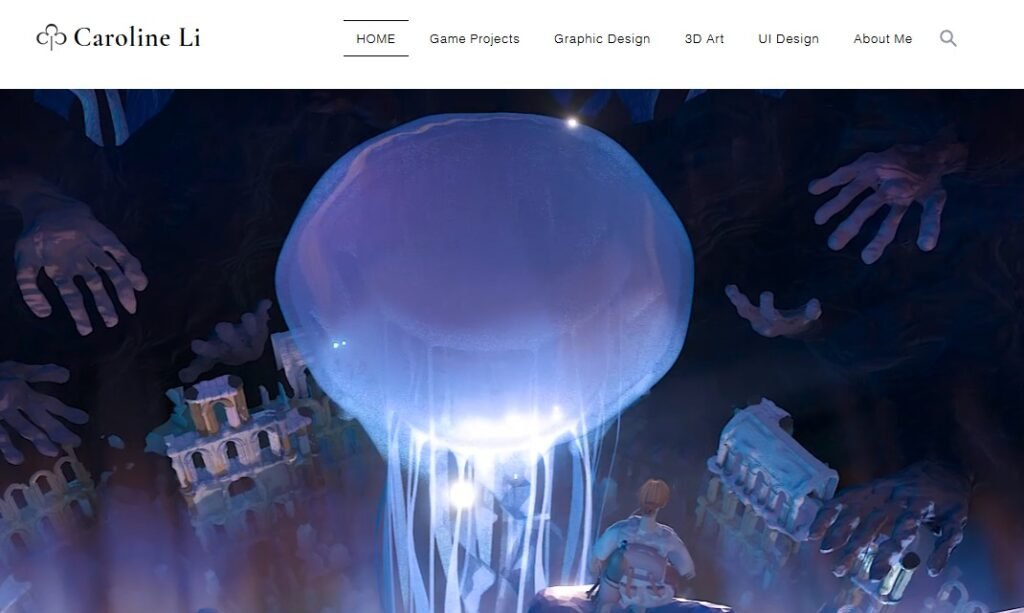
Caroline Li’s portfolio demonstrates the value of clear organisation and specialisation.
Her work is divided into distinct areas, making it easier for visitors to find projects relevant to their interests.
This is particularly useful for professionals with experience across several disciplines.
The lesson isn’t that your portfolio needs to copy someone else’s design. It’s that visitors should be able to understand what you do and where your strongest skills lie without having to dig for the information.
Your Online Portfolio Is an Extension of Your CV
A good online portfolio doesn’t replace your CV.
It works alongside it.
Your CV gives recruiters a quick overview of your professional background, while your portfolio allows you to provide examples and evidence of your skills.
The best portfolios are not simply collections of work. They tell a clear professional story:
This is who I am.
This is what I specialise in.
This is what I’ve done.
This is what I can do for your organisation.
You don’t need a huge website to achieve that.
Start with your strongest work, organise it clearly, make it easy to navigate and give employers an easy way to contact you.
And if you don’t have a website yet, an affordable website builder such as Hostinger can give you a straightforward way to create your own professional online presence without needing to become a web developer first.
FAQs about How to Build a Professional Online Portfolio
How many projects should I include in my portfolio?
There is no magic number. Focus on quality and relevance rather than trying to fill your website with every project you’ve ever completed.
A few strong projects that demonstrate your abilities are generally more useful than a large collection of weak or unrelated work.
Can students create an online portfolio?
Absolutely. Students and recent graduates can use portfolios to showcase academic projects, personal projects, volunteer work, internships and other relevant experience.
A portfolio can be particularly useful when you don’t yet have a long employment history.
Is LinkedIn enough instead of having a portfolio website?
LinkedIn is an important professional networking platform, but your own website gives you considerably more control over how your work is presented.
You can decide what to showcase, how it is organised and how visitors move through your content.
For professionals whose work benefits from visual examples, detailed projects or case studies, having both a LinkedIn profile and a personal portfolio website can be a strong combination.
Do I need my own domain name?
You don’t absolutely need one, but owning a professional domain gives you a dedicated online identity and makes your portfolio easier to share. A domain based on your name is often a good choice for a personal portfolio.
Can I create an online portfolio without coding?
Yes. Website builders allow you to create and customise websites without writing code. Tools such as Hostinger’s website builder and AI website-building features can help you create the basic structure of a portfolio website.
Should I put my portfolio link on my CV?
Yes, if your portfolio is relevant to the position and contains useful examples of your work.
Place the link somewhere easy to find, such as alongside your contact information.
Key Takeaway
Don’t just list your skills. Organize your professional online portfolio like a business, categorize your services, make navigation intuitive, and ensure your presentation is flawless. Hostinger’s templates and AI Builder can give you this professional structure instantly.
Related Articles
- How to Write a Strong CV that Gets You Noticed
- How to Write a Good Cover Letter that Complements Your CV
Affiliate Disclosure
Some of our articles may include links to products, services, or resources that we believe could be helpful to job seekers and employers, some of which are affiliate links, which means we may earn a small commission if you make a purchase, at no extra cost to you. These small commissions help support our editorial team, so we can continue reviewing, testing, and sharing the most useful and effective tools and resources for job seekers.